We have one entity in Quickbooks, another in Xero and another using Freshbooks.
We also have some data in Holded.
Share and discuss the best content and new marketing ideas, build your professional profile and become a better marketer together.

We have one entity in Quickbooks, another in Xero and another using Freshbooks.
We also have some data in Holded.

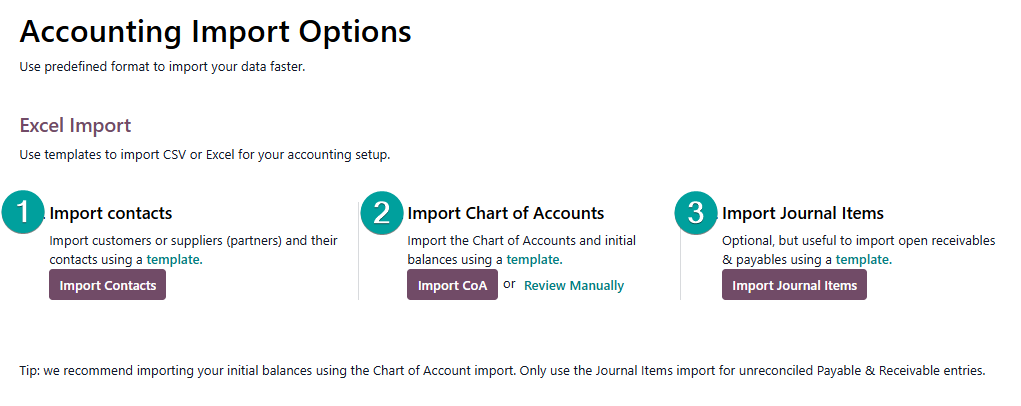
In Odoo 18.0 and Odoo 19.0 we have templates available for Customers, Chart of Accounts and Jounal Items (General Ledger).
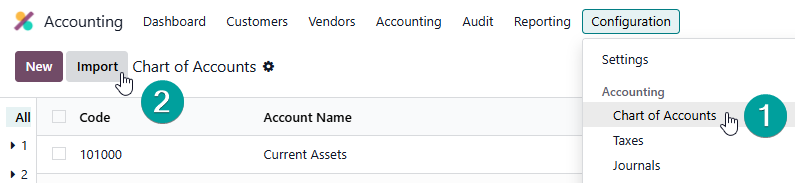
First, visit the Accounting --> Configuration --> Chart of Accounts Menu, then click Import:
You can then access the templates:
Many Users also want to import the details of some balances, such as Inventory and Fixed Assets, in this case you can use clearing accounts. You import the total balance into the clearing account, and your transactional line item balances as transactions into the actual account, using the clearing account as the counterpart. So you can import $500 worth of inventory into Inventory Clearing, then load your Inventory as 5 items @ $100 into Current Assets, emptying out the clearing account in the process.
Your Odoo Advisor or Odoo Partner can help you here.
The great thing about Odoo is that you have plenty of time to get this right, as the Journal Entries representing these balances can be deleted and re-imported until you are happy with your Reports.
Other useful resources:
https://www.odoo.com/documentation/master/applications/essentials/export_import_data.html
Create an account today to enjoy exclusive features and engage with our awesome community!
Sign up