I enable the 'sales receipt' button in accounting configuration, however, the 'receipt' button is not appear under customer.
Welcome!
Share and discuss the best content and new marketing ideas, build your professional profile and become a better marketer together.
This question has been flagged
1
Reply
488
Views


First enable 'Sales Receivable' from the configuration settings:
1. Accounting- >Configuration -> Customer Invoice -> Sale Receipt

In Odoo 16.0, 17.0 and 18.0 you can see the Receipts Menu within the Customers menu.

In more recent online versions and Odoo 19.0, there is a radio button instead (no new Menu) and you use the Customer Invoices Menu:
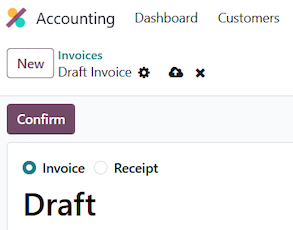
For more details, please refer to the blog:
1. https://www.cybrosys.com/blog/how-to-use-sales-receipt-purchase-receipt-in-odoo-18-accounting
Hope it helps.
Your Answer
Enjoying the discussion? Don't just read, join in!
Create an account today to enjoy exclusive features and engage with our awesome community!
Sign up