Skip to Content

Welcome!

Share and discuss the best content and new marketing ideas, build your professional profile and become a better marketer together.

Sign up

You need to be registered to interact with the community.
This question has been flagged
1 Reply
78 Views

I have just started my Odoo experience today.

My new company sells only in Canada but I buy from US suppliers.

I am finding help to activate multiple currencies but everything points to an option that is not showing on my screen. I only show main currency as an option. there is no check box for multiple currencies. I am in ACCOUNTING > CONFIGURRATION > SETTINGS


When I click on currencies I do not see USD as an option.

Avatar
Discard

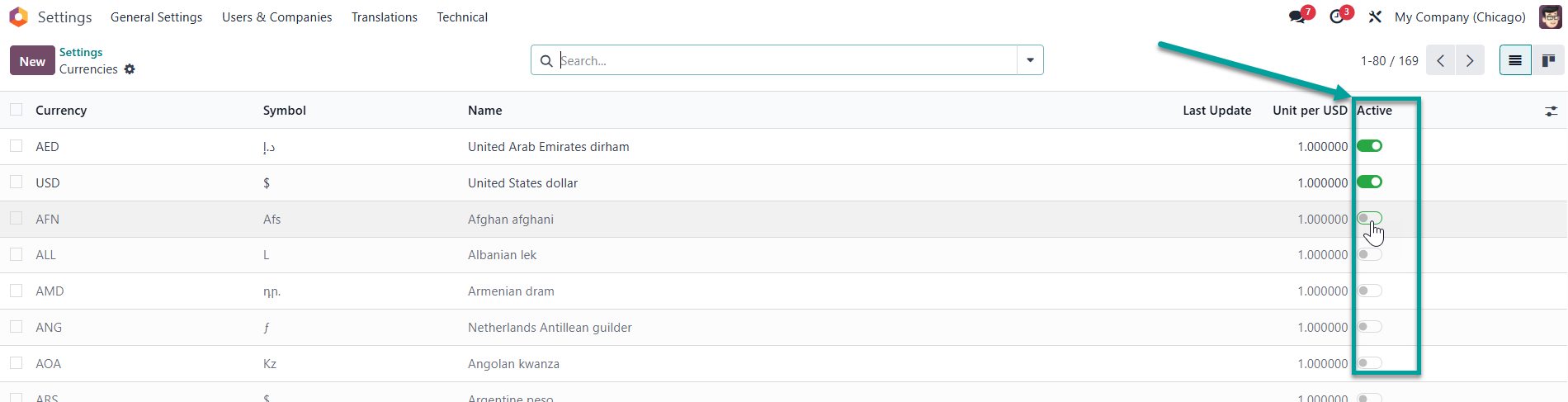
First activate the currency, after that it will be available for selection.

  1. Go to "Currency"
  2. Activate the currency you need
  3. The currency will appear in the list for selection
Avatar
Discard

Your Answer

Please try to give a substantial answer. If you wanted to comment on the question or answer, just use the commenting tool. Please remember that you can always revise your answers - no need to answer the same question twice. Also, please don't forget to vote - it really helps to select the best questions and answers!