In Odoo 19, inventory valuation no longer posts journal entries at each warehouse transfer.
Instead
- Costs are stored directly on incoming and remaining stock moves (not outgoing)
- Posting is delayed until invoicing
- Accrual entries are used for good receipts/deliveries not invoiced (GRNI and GDNI)
- Accrual entries are used for invoiced not received/delivered goods (GINR and GIND)
- A closing entry reconciles the Inventory Stock Report with the Balance Sheet
- The Inventory Stock Report is now your real‑time source
- The Balance Sheet is accurate only after closing
Configuration used in this answer
- Perpetual (at invoicing) Inventory Valuation Method
- the Average Price Costing Method
- a current asset Stock Variation account configured as the Variation Account on the Stock Account of the Product Category
You are right, the end of period 'Inventory Variation' entry is a high-level summary and intentionally lacks detail.
Where to Find the Details
- Product‑level detail comes from Accrual Entries
- Accrued Expenses (purchases received but not billed and billed not received)
- Accrued Revenue (sales delivered but not invoiced and invoiced not delivered)
- In addition to being available in the Sales and Purchases Apps (after selecting relevant Orders and using the Action Menu), these are now accessible from the Accounting app under Regularization Entries (e.g., “Bills to Receive,” “Invoices to be Issued”)
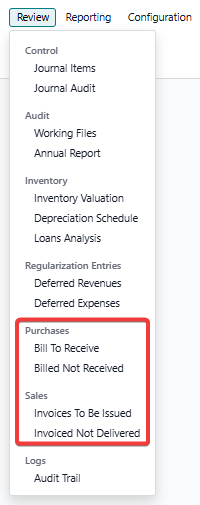
Note: these are the same Wizards, they just now work on Order Lines instead of Orders. The prior Wizards in the Sales and Purchase Apps are still available and have not changed.
Step by Step Example
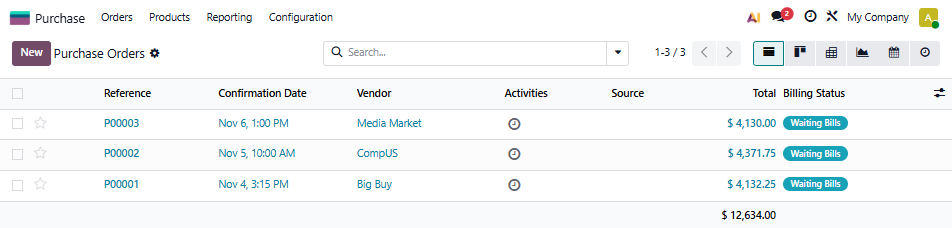
- order four products from three vendors
- do not receive any Vendor Bills
- follow the period end close process
- see how Odoo accounts for the inventory postings we can expect when Bills arrive
- see how Odoo updates the Balance Sheet
- receive our Vendor Bills
- follow the period end close process
Three Purchase Orders
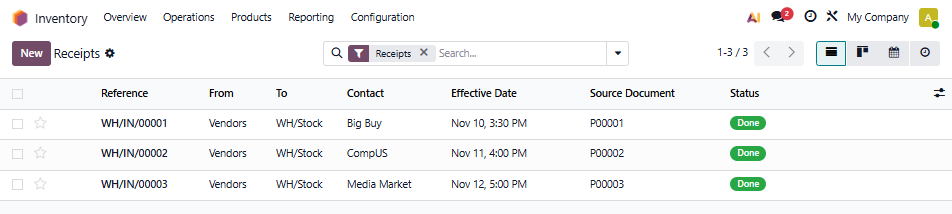
Three Warehouse Receipts
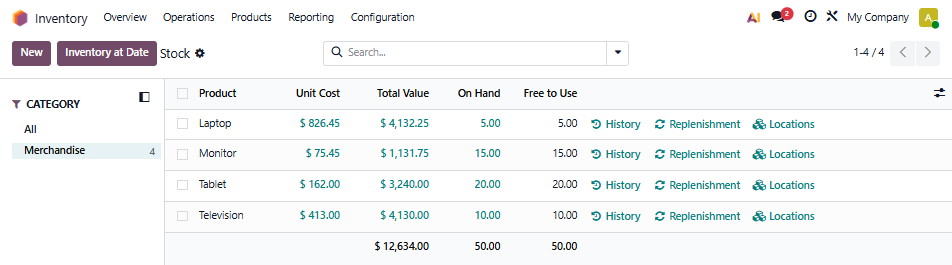
The Inventory Stock Report
The Moves Analysis Pivot
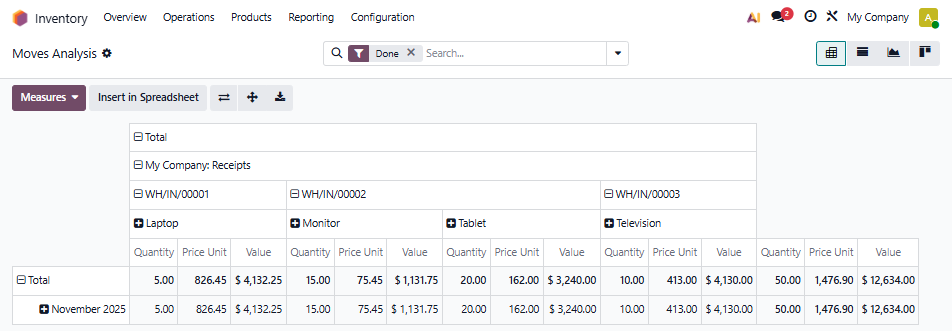
Remember: Odoo now stores the Unit Price, Value and Remaining Value on each incoming Stock Move and updates is as needed (except on outgoining Stock Moves) instead of the prior Stock Valuation Layer approach.
At this point, we have nothing on our Balance Sheet since no Journal Entries were created when we received goods and there are no Vendor Bills.
Our Inventory Valuation Report looks like this
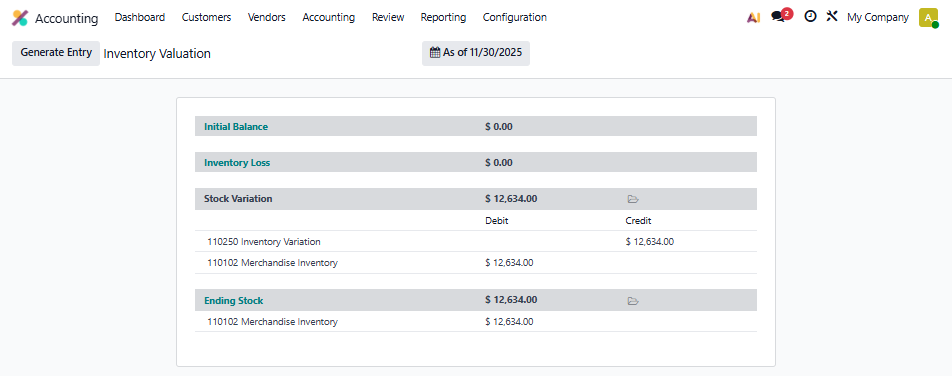
As part of the closing process we also run our accrued entries for expected postings to the balance sheet when the Bills are posted
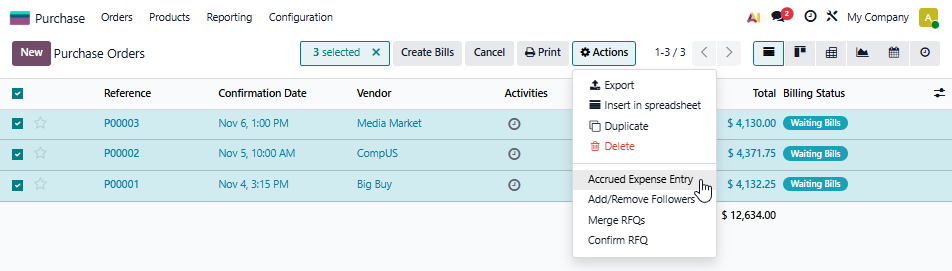
Remember: we can also use the new Menu's in the Accounting App for this.
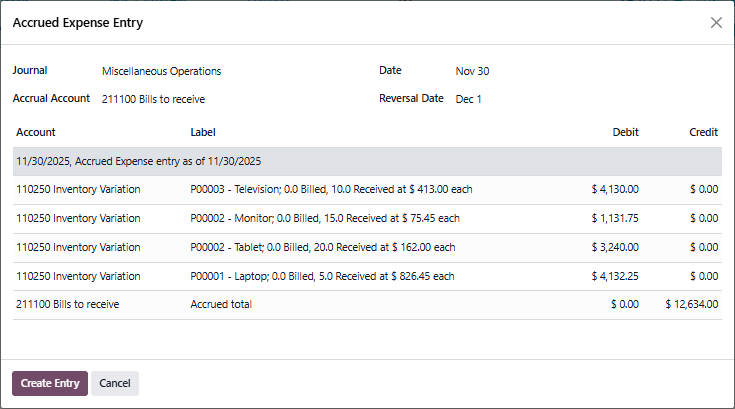
This is the entry for our Purchases Received but not Billed
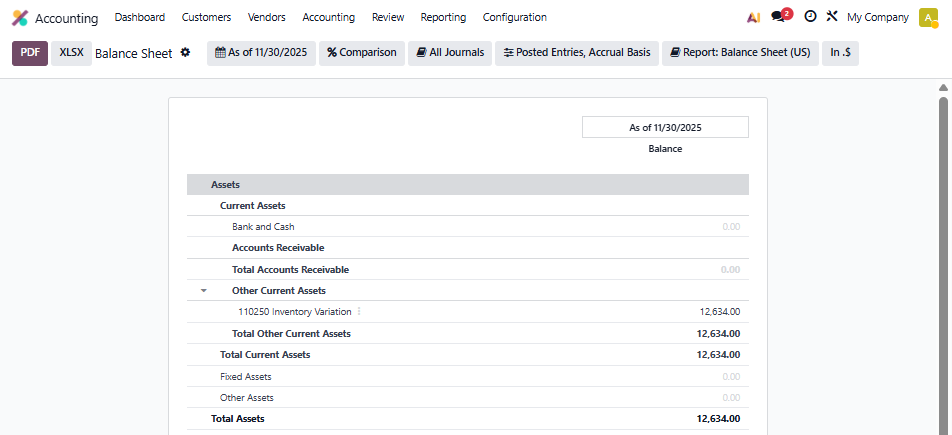
So at this point our Balance Sheet looks like this
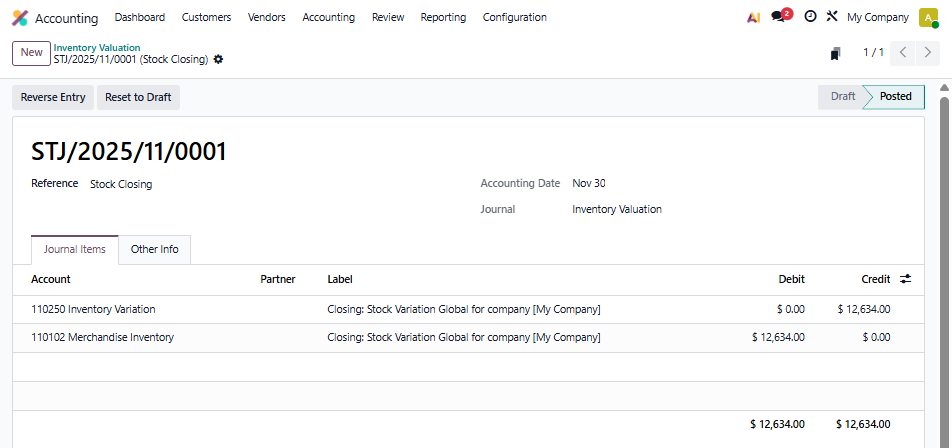
Then we generate the closing entry which looks like this
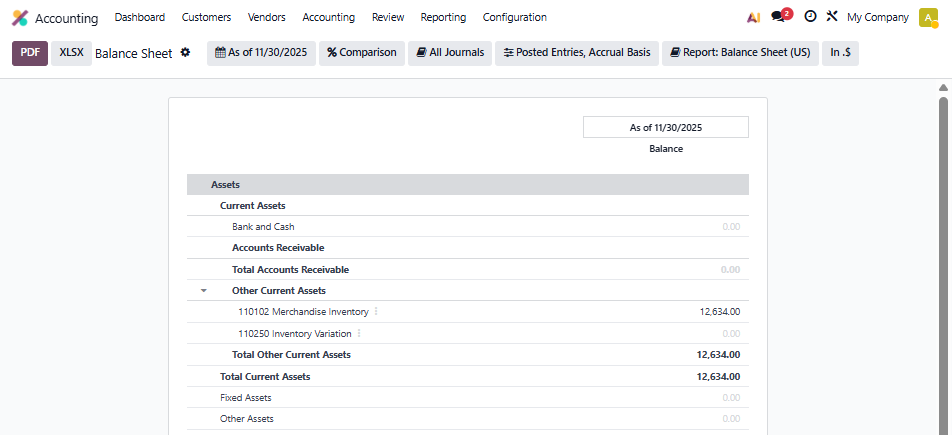
At this point our Balance Sheet looks like this
The Journal Items posted in the General Ledger
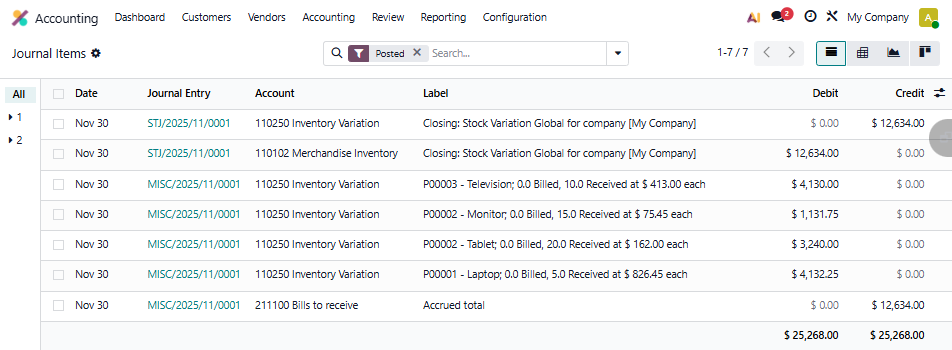
As you can see, there is a debit for each expected posting to come next period for the Vendor Bills, showing the PO, the Product, the Quantity and the unit price that the Bill should show.
Now, in the next period, let's receive the Bills just for the first and third purchase order.
Since Vendor Bills post Journal Entries for inventory, after the accrual entries from November are reversed, we will see these Journal Items in December
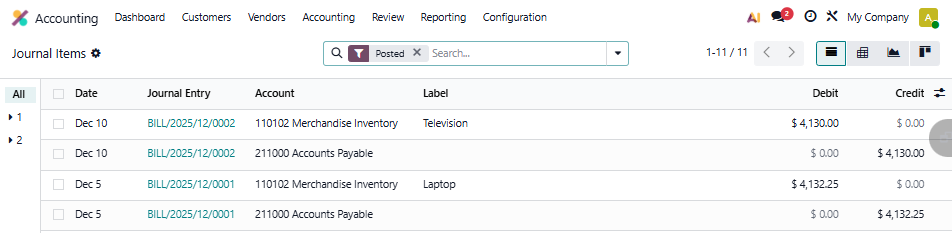
Let's look at the Balance Sheet after the recording of the two Bills, but before the close:
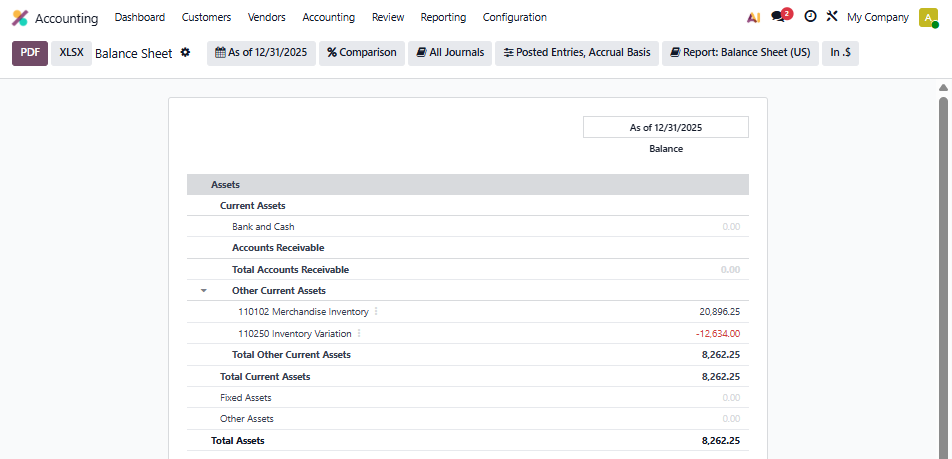
It is clearly in need of an update, showing $20,896.25 worth of Merchandise Inventory and $8,262.25 worth of total Inventory. We know the balance sheet is 'under construction' between closes.
This is a massive conceptual shift. The Balance Seet is no longer "live" for inventory.
Remember, with Odoo 19 we are now operating under a delayed posting and closing required approach for our Balance Sheet. The closing entry is needed before we look at the Balance Sheet. If needed, this entry can be automated on a daily or monthly basis.
The Inventory Stock Report is now the source for real-time inventory quantities and values - updated instantly. The Balance Sheet is accurate when the closing entry is run and, as needed, in conjunction with the accrual entries at the end of the period.
So, we repeat the closing process.
First, the entry for our Purchases Received but not Billed
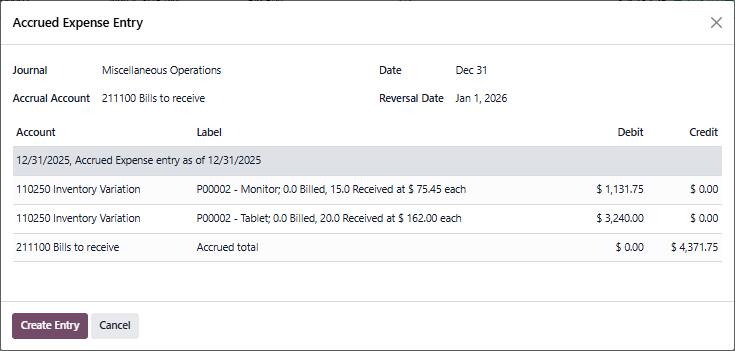
At this point our Balance Sheet looks like this
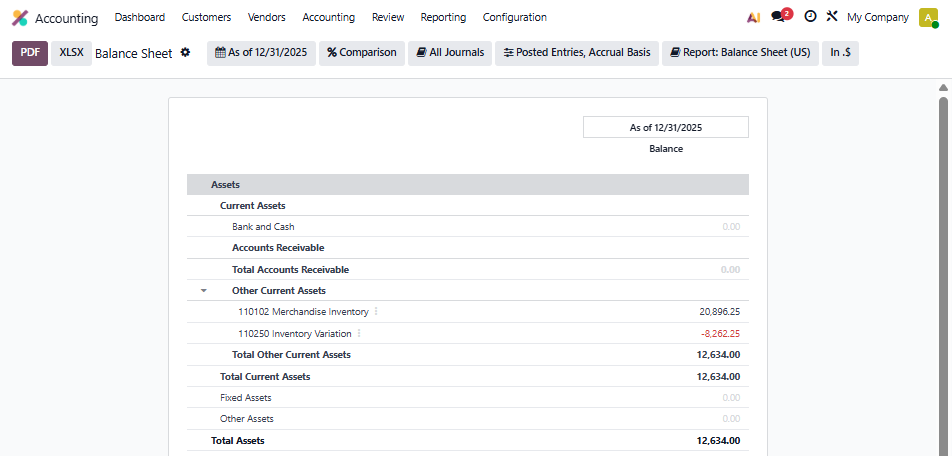
Our Inventory Valuation Report
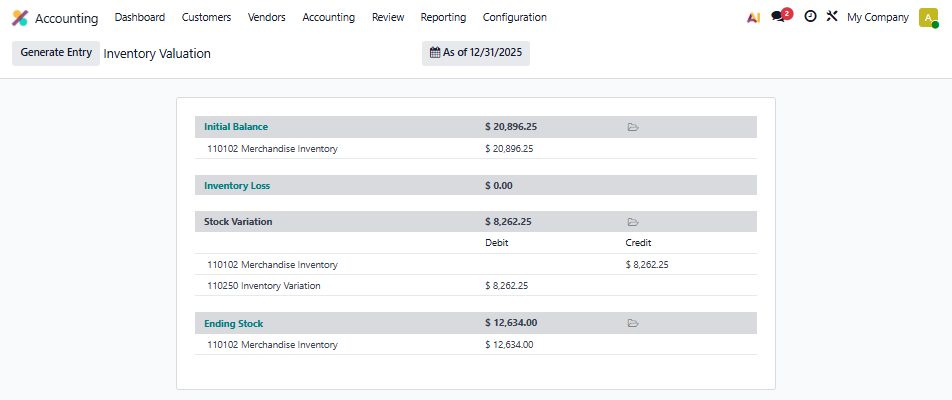
Then we generating the closing entry which looks like this
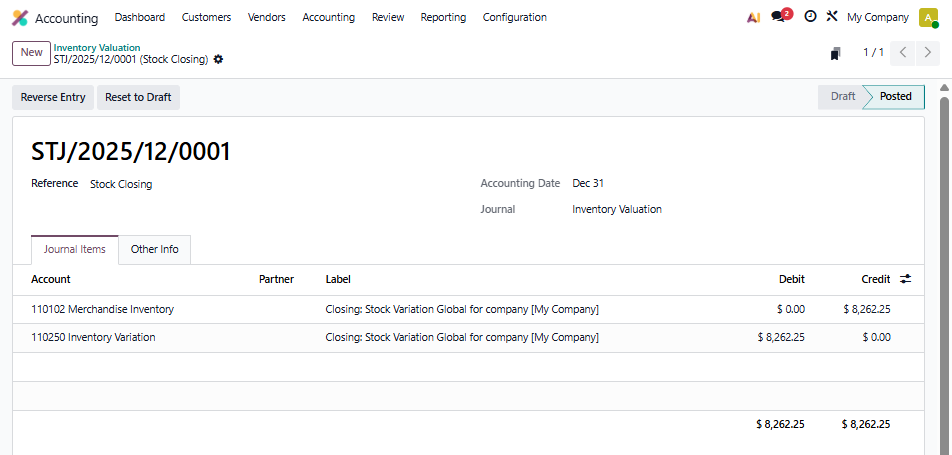
At this point our Balance Sheet looks like this
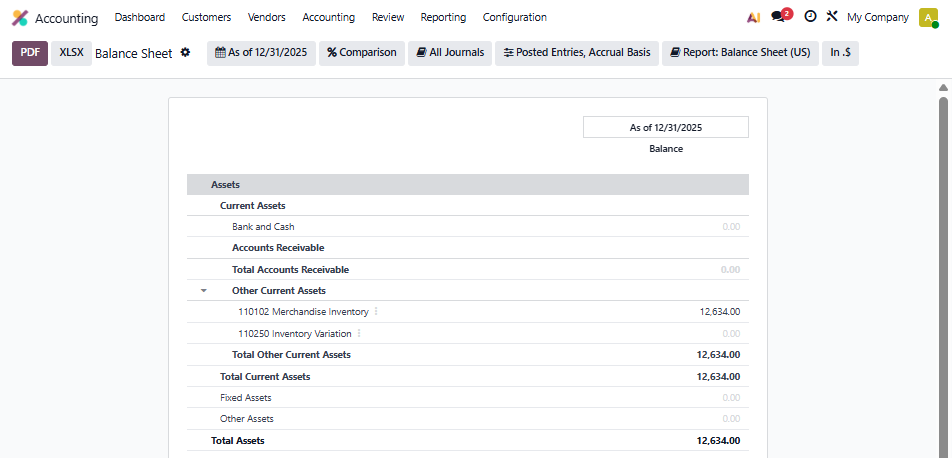
Our Balance Sheet is fully correct.
It may feel unusual at first, but this design separates operational reporting from financial posting. Once you get used to it, reconciliation is simpler and clearer. Remember, this entry can be generated daily (automatically) if needed.
What This Means for You
- Balance Sheet: Only accurate after closing entries are run (daily, monthly, or on demand)
- Inventory Stock Report: Your real‑time view of quantities and values - always
- Accrual Entries: Provide the missing detail for product receipts/deliveries not yet invoiced or invoices for products not received/delivered
- Reconciliation: Closing entries + accrual entries ensure the Balance Sheet matches operational reality
Key Takeaways
- Don’t expect the Balance Sheet to reflect live inventory between running the closing entry
- Use the Inventory Stock Report for operational decisions
- Run accrual entries and closing entries regularly to keep financials aligned
- Think of this as a subledger approach: operational stock vs. financial accounting snapshots
Additional background on postings
- Direct posting - Operation is Trigger
- physical inventory; scrap; manufacturing orders - Delayed posting - Financial Step is Trigger
- inventory revaluation; delivery, receipt, return of goods; landed costs

