Skip to Content

Welcome!

Share and discuss the best content and new marketing ideas, build your professional profile and become a better marketer together.

Sign up

You need to be registered to interact with the community.
This question has been flagged
1 Reply
42 Views

We have been working with Odoo v19 inventory valuation and have encountered a significant accounting compliance concern that has not been clearly resolved through Support. I am posting here to determine whether there is a standard configuration, workaround, or upcoming improvement.

Issue Summary

Under GAAP, inventory and Cost of Goods Sold must be recognized in the correct period, even if vendor bills are received after month-end.

However, in Odoo v19:

  • Inventory valuation and COGS are only posted when the vendor bill is created
  • If the bill is received in a later month, the valuation is posted in that later period
  • This causes misstated inventory and COGS in the prior month, which is not GAAP-compliant

Open Questions

  1. What is the recommended GAAP-compliant workflow when vendor bills arrive after month-end?
  2. Is there a way to recognize inventory and COGS at delivery/receipt, and then clear interim accounts when the bill arrives?
  3. Does the Periodic (At Closing) setting resolve this, and if so:
    • How does COGS get recognized at the time of sale?
    • Are additional end-of-month processes required?
  4. Is this behavior a known limitation in v19 with planned enhancements?

Why this matters

We are a Global Odoo Partner based in the United States, and the majority of our mutual customers in the Americas follow GAAP accounting standards. If inventory valuation is only triggered by vendor bills, many users will face incorrect financial statements at period close.

Support Outcome

Support described how v19 currently works but did not confirm:

  • Whether it is GAAP-compliant
  • Whether a workaround exists
  • Whether improvements are planned

The support ticket was closed without a solution, so we are seeking clarification here.

Avatar
Discard

Odoo 19 no longer creates journal entries upon the physical receipt or delivery** of goods.

We have shifted this responsibility from warehouse operations to the accounting team. The new design centralizes inventory accounting in the Accounting app, posting at the time of the financial transaction (vendor bill / customer invoice) with the flexibility to post before or after as needed (bill and hold, FOB origin, sale on approval,etc.) and finalizing the period's valuation with a single, comprehensive month-end journal entry with a balance that is then cleared via accruing for bills not received, goods billed not received, invoices to be issued, goods invoiced not delivered and work in progress.

This new model significantly reduces the reconciliation work required between warehouse-generated entries and the general ledger.


>> Inventory valuation and COGS are only posted when the vendor bill is created

They are recorded when the Customer Invoice is posted.  We would suggest reviewing the Valuation Cheat Sheet at https://www.youtube.com/watch?v=jqMwAkv1f3g


Sample Workflow

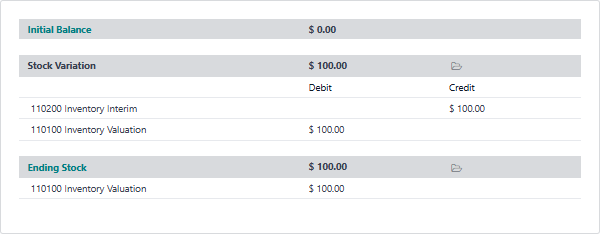
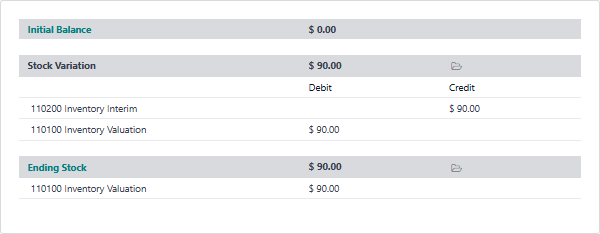
Let’s review the new Inventory Valuation report in Accounting after a simple Purchase / Sell / Deliver / Invoice workflow.

1) Purchase 10 items at $10 each and receive them:


2) Sell one item at $50 and deliver it:


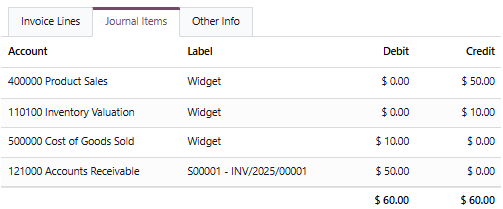
3) Invoice the Sale:


Journal Entries from the Customer Invoice:


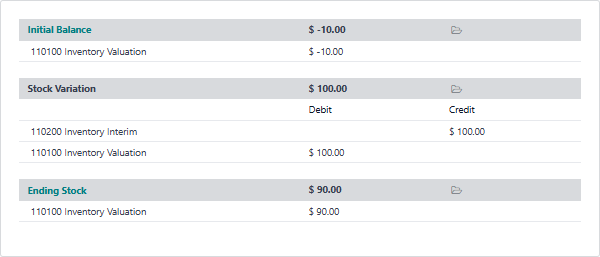
Although no journal entries are generated during the receipt and delivery of inventory, you can see the effect of these entries is managed via the new Inventory Valuation Report.


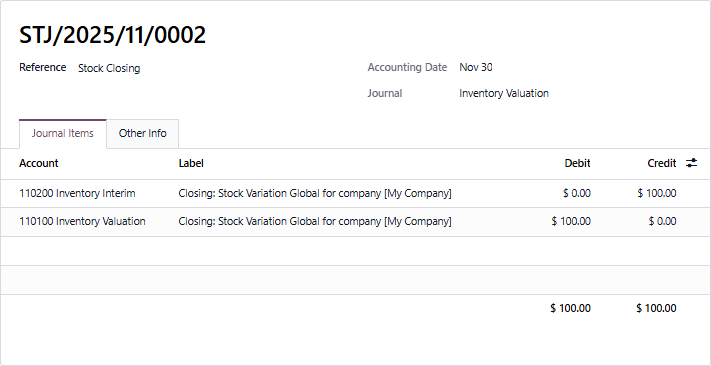
You now post the closing entry from the Inventory Valuation Report:


The standard month end process would then include clearing the inventory interim credit balance by generating accrual entries for unbilled Purchases:

You can see here there is detailed information about each unbilled purchase order, the product, the quantities and the price. 


Balance Sheet at month end:


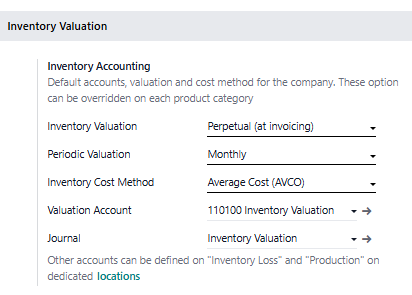
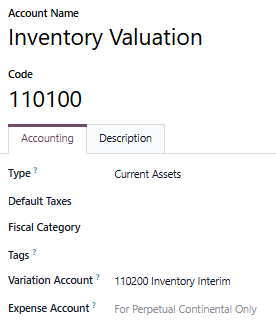
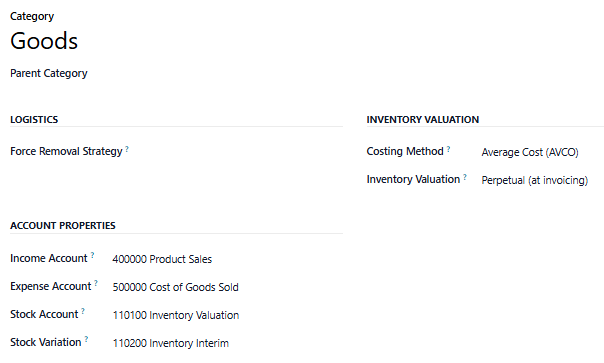
Odoo 19 Configuration

Accounting


Chart of Accounts


Product Category 


Avatar
Discard

Your Answer

Please try to give a substantial answer. If you wanted to comment on the question or answer, just use the commenting tool. Please remember that you can always revise your answers - no need to answer the same question twice. Also, please don't forget to vote - it really helps to select the best questions and answers!