Skip to Content

Welcome!

Share and discuss the best content and new marketing ideas, build your professional profile and become a better marketer together.

Sign up

You need to be registered to interact with the community.
This question has been flagged
1 Reply
34 Views

How can i change the description of the field? I use odoo 18 and with this example it does not work. The label remains the same.


<record id="view_purchase_order_form" model="ir.ui.view">

​<field name="name">purchase.order.form</field>

          <field name="model">purchase.order</field> ​ ​

          <field name="inherit_id" ref="purchase.purchase_order_form"/>

          <field name="arch" type="xml">

                 <xpath expr="//field[@name='order_line']/form//field[@name='product_uom']" position="attributes">

                    <attribute name="string">Mengeneinheit</attribute>

                </xpath>                   

            </field>

</record>

Avatar
Discard

Hello,

Your code will change it in order_line form view but if you want to change it for list view use the below:

I used [@name='product_uom'][2] because there are two fields with name product_uom

<record id="view_purchase_order_form" model="ir.ui.view">

​<field name="name">purchase.order.form</field>

          <field name="model">purchase.order</field> ​ ​

          <field name="inherit_id" ref="purchase.purchase_order_form"/>

          <field name="arch" type="xml">

                 <xpath expr="//field[@name='order_line']//list//field[@name='product_uom'][2]" position="attributes">

                    <attribute name="string">Mengeneinheit</attribute>

                </xpath>                   

            </field>

</record>
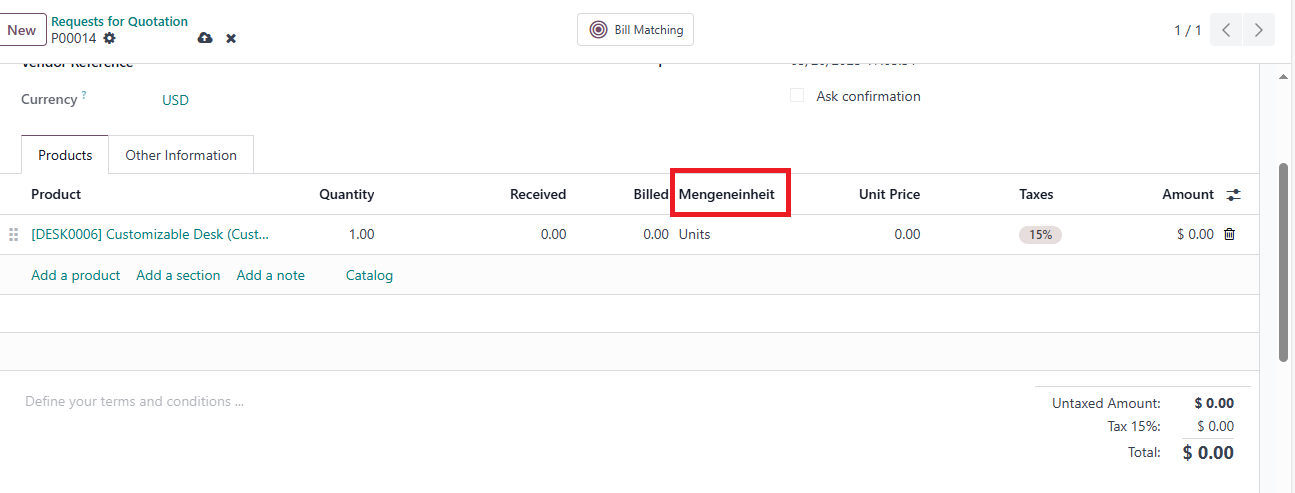
Result will look like:

Avatar
Discard

Your Answer

Please try to give a substantial answer. If you wanted to comment on the question or answer, just use the commenting tool. Please remember that you can always revise your answers - no need to answer the same question twice. Also, please don't forget to vote - it really helps to select the best questions and answers!