Just follow what odoo did for the task
1. You need to add xml data something like this
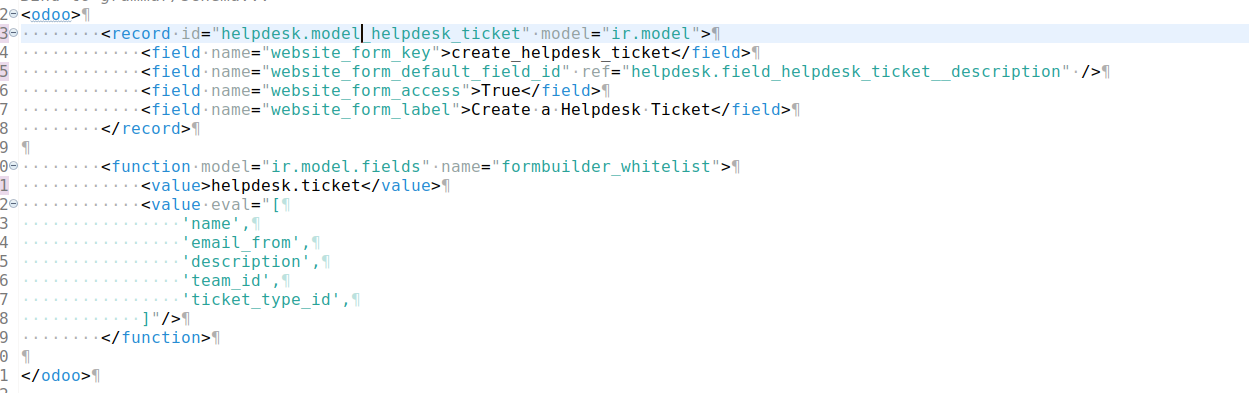
2. Then you need to define some js code like this
odoo.define('website.form_editor_registry', function (require) {
'use strict';
var Registry = require('web.Registry');
return new Registry();
});
odoo.define('website.send_mail_form', function (require) {
'use strict';
var FormEditorRegistry = require('website.form_editor_registry');
const { _lt } = require('@web/core/l10n/translation');
FormEditorRegistry.add('create_helpdesk_ticket', {
formFields: [{
type: 'char',
custom: true,
required: true,
fillWith: 'name',
name: 'name',
string: _lt('Your Name'),
}, {
type: 'tel',
custom: true,
fillWith: 'phone',
name: 'phone',
string: _lt('Phone Number'),
}, {
type: 'email',
modelRequired: true,
fillWith: 'email',
name: 'email_from',
string: _lt('Your Email'),
}, {
type: 'char',
custom: true,
fillWith: 'commercial_company_name',
name: 'company',
string: _lt('Your Company'),
}, {
type: 'char',
modelRequired: true,
name: 'subject',
string: _lt('Subject'),
}, {
type: 'text',
custom: true,
required: true,
name: 'description',
string: _lt('Your Question'),
}],
fields: [{
name: 'email_to',
type: 'char',
required: true,
string: _lt('Recipient Email'),
defaultValue: 'info@yourcompany.example.com',
}],
});
});
Where 'FormFields' will be use to render all the field in the form and the 'fields' is to render the option that you need to choose on the right side bar in editor mode
And don't forget to add that in manifest asset: 'website.assets_editor': ['yourmodule_name/src/static/js/....']


