Skip to Content

Welcome!

Share and discuss the best content and new marketing ideas, build your professional profile and become a better marketer together.

Sign up

You need to be registered to interact with the community.
This question has been flagged
1 Reply
44 Views

Vendor Bill can nomore be created by the purhcase app,

this for me is an important regression and move from a lean approach to a silos approach.

the purchase office is the responsible with relation with supplier.

It interacts with the supplier in handling all the aspect. Including price, quantity and payment

if the draft vendor bill is created by the buyer, it can reflect all those interactions.

when the real bill arrives, typically to accounting, the accounting can match it with the draft.

if the vendor bill is created by accounting then we retuns to have accounting people asking to the buyer explanation on differences.

Another point is that with exception of very small organization the vendor bill are sent to the accounting office or are left to logistic and not sent to buyer. So, the upload vendor bill button is not where it is needed.

there si any way to restore the create vendor bill button in purhcase order?

Avatar
Discard

UPDATE: This is no longer necessary, simply select the Purchase Order in List View and use the Create Bills button:


ORIGINAL ANSWER:

Via Odoo Studio, you can add a button to the Purchase Order that creates the Bill.


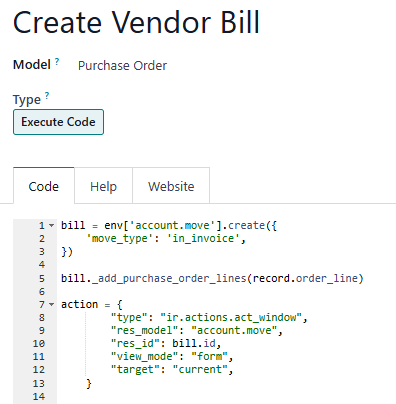
1. Create the following Server Action:

# code updated to add Vendor (which will add Payment Terms)

bill = env['account.move'].create({
    'move_type': 'in_invoice',
'partner_id': record.partner_id.id,
})

bill._add_purchase_order_lines(record.order_line)

action = {
        "type": "ir.actions.act_window",
        "res_model": "account.move",
        "res_id": bill.id,       
        "view_mode": "form",       
        "target": "current",     
    }


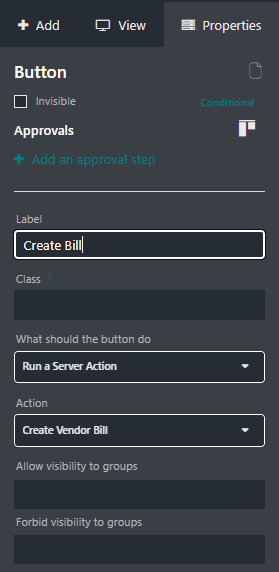
2. Add a New Button to the Purchase Order Form View:


0

Avatar
Discard

Your Answer

Please try to give a substantial answer. If you wanted to comment on the question or answer, just use the commenting tool. Please remember that you can always revise your answers - no need to answer the same question twice. Also, please don't forget to vote - it really helps to select the best questions and answers!