For background on how you can plan a site move, see https://developers.google.com/search/docs/crawling-indexing/site-move-with-url-changes
In Odoo:
1. Activate Developer [debug] mode
2. Visit > Website App --> Configuration --> Redirects

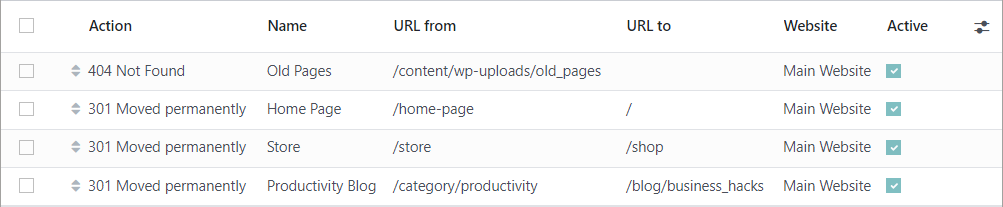
Goal
Used to point your old URL to a new page in order to redirect anyone who clicks on the old URL to the new one. It is useful to keep the value of the old URL (SEO) and to guarantee a good user experience.
Kinds of URLs
- Pages: static pages on the website which are not related to the backend (ex: /home, /contactus, …)
- Views: dynamic pages, display information from the backend and related to a module (ex: /shop, /partners, /events, etc.)
- Nonexistent : URL which are not related to specific pages of your website (ex: /test, /idontexist)
- External: from another domain (ex: www.anotherwebsite.com, etc)
Kinds of redirects
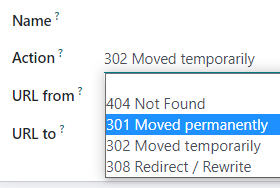
- 301 move permanently: A browser redirects to the new URL and remembers this new URL. Search engines update their links to the resource.
- 302 move temporarily: A browser redirects to the new URL BUT doesn’t remember this new URL. Search engines assume that the old URL will be used again at a later date.
- 308 rewrite/redirect: Used if you want to rename a controller with a new URL (ex: /shop becomes /magasin, both are accessible but /shop will automatically be redirected to /magasin)
- 404 not found: used if you want to remove a specific page/controller (ex : ecommerce is installed but you don’t want /shop on a specific website)
Rules
[301][302] Allow to redirect only unpublished pages or nonexistent URLs to another URL (pages, views, nonexistent urls, or external URLs)
[301][302] If you want to redirect to an external URL, pay attention to add the protocol at the beginning of the URL (ex: from /test to https://www.anotherwebsite.com)
[301][302] If you want to redirect a view or an existing page to another URL, you first need to create a [404] action that removes your view or to unpublish your page before creating the [301] or [302] redirection. Instead of creating a [404] action to remove the view, you can also delete the module from your DB.

