Skip to Content

Welcome!

Share and discuss the best content and new marketing ideas, build your professional profile and become a better marketer together.

Sign up

You need to be registered to interact with the community.
This question has been flagged
1 Reply
83 Views

1. Log in to the Odoo admin as administrator. Activate Technical Features, if not already activated, by going to Settings > Users > Users > Admin > Edit > Usability > Technical Features > check the box (on), click Save.


2. Go to Settings > Technical > User Interface > Views.

In the search box, next to filter icon, type "Footer Copyright", and hit enter to search.


3. It will show: View name: Footer Copyright. Click to open it. Click Edit.


Comment out lines of the code as follows:

<!-- Powered by <a class="label label-danger" href="http://www.odoo.com/page/website-builder">Odoo</a>,

the #1 <a href="http://www.odoo.com/page/e-commerce">Open Source eCommerce</a>. -->

Click Save.


4. Refresh the browser view of your Odoo front end website. Log out and try to logi in again. The previously visible "Powered by" backlinks and text, are gone.

Congrats.

Avatar
Discard

odoo 12.0+ 

In the search box type:Brand Promotion Message

View name: Brand Promotion Message. Click to open it. Click Edit

delete:

<t t-set="final_message">Powered by %s%s</t> 

<t t-raw="final_message % (odoo_logo, _message and ('- %s' % _message) or '')"/>

"Save":Congrats.

 
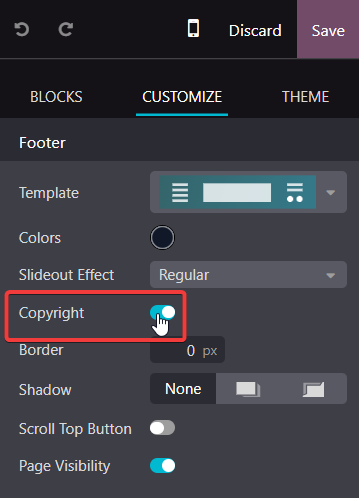
for anyone who did not want to touch any kind of code, can be tried with by disable the "Copyright" at "Footer Block" through website editor mode. Just try it at Odoo 17 EE.


Avatar
Discard

Your Answer

Please try to give a substantial answer. If you wanted to comment on the question or answer, just use the commenting tool. Please remember that you can always revise your answers - no need to answer the same question twice. Also, please don't forget to vote - it really helps to select the best questions and answers!