If you're not developer than this is the easiest solution you can implement by yourself:
- Go to Automated Actions:
- In Odoo, navigate to "Settings" (or "Technical Settings" if you don't see Settings).
- Search for "Automated Actions" and open it.
- Create a New Automated Action:
- Configure the Automated Action:
- Model: Select "Users" (res.users).
- Trigger: Select "On Creation".
- Apply on: Leave as "All Records" (or you can add a condition if needed).
- Action To Do: Select "Execute Python Code".
- Python Code:
- In the "Python Code" section, enter the following code:
# Allow only users with email ending in "@mycompany.com"
allowed_domain = "@mycompany.com"
user_email = record.email or record.login  # fallback to login if email is not set

if user_email and not user_email.lower().endswith(allowed_domain.lower()):
    raise UserError("Signup is restricted to users with @mycompany.com email addresses.")
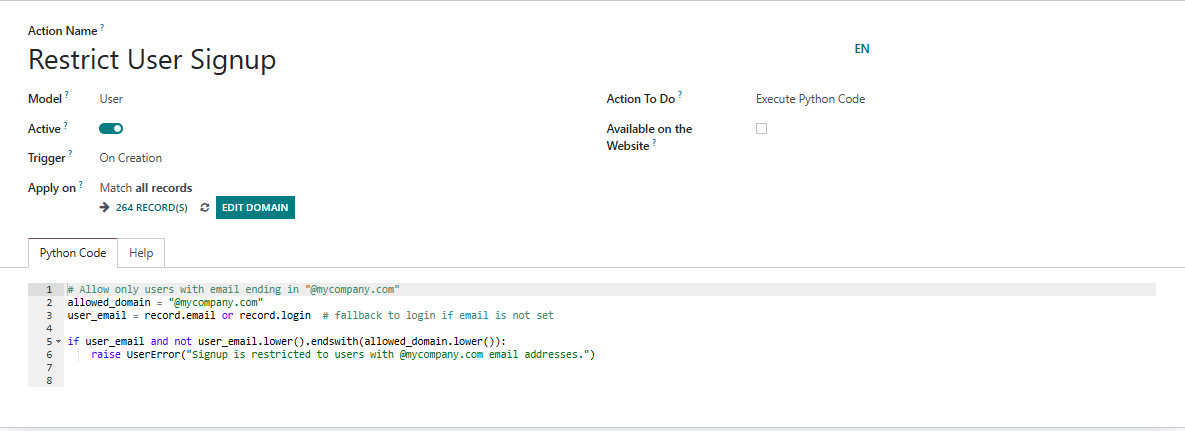
5. Save and Close
If you know how to code then use this solution: Add this code in some module or create your own custom module and add this code to fix it.
from odoo import models, fields, api
from odoo.exceptions import ValidationError

class ResUsers(models.Model):
    _inherit = 'res.users'

    @api.model
    def create(self, vals):
        if 'login' in vals and not vals['login'].endswith('@MyCompany.com'):
            raise ValidationError("Only users with @MyCompany.com email addresses can sign up.")
        return super(ResUsers, self).create(vals)
I hope it helps.

